
Building a Fun and Smart Home with a DIY Smart Doorbell

  Title: Building a Fun and Smart Home with a DIY Smart Doorbell Introduction: In the exciting world of electronics, there's nothing quite as thrilling as creating your very own smart home gadgets. Today, we'll embark on a journey to build a Smart Doorbell using simple and easily accessible equipment like the Arduino Uno, an IR proximity sensor, and a buzzer. This DIY project is not only a fantastic introduction to electronics but also a step towards transforming your home into a tech-savvy haven. So, gear up, young inventors, as we venture into the world of smart homes! Materials You'll Need: 1. Arduino Uno: The brain of our smart doorbell, capable of processing information and controlling the connected devices. 2. IR Proximity Sensor: A nifty gadget that detects the presence of objects in its vicinity. 3. Buzzer: This component will be the voice of our smart doorbell, alerting you when someone approaches. Step 1: Setting Up the Arduino Uno: Begin by connecting your Arduin...
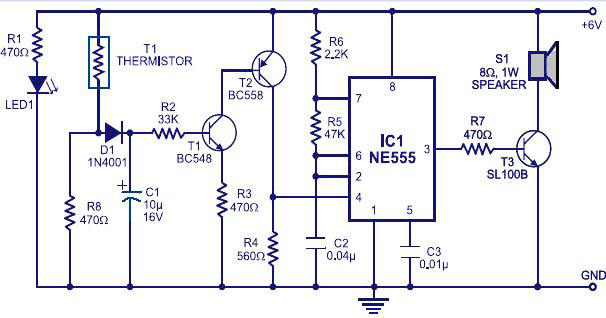
Fire alarm using a themistor and 555timer

Fire Alarm


Fire Alarm


The thermistor offers a low resistance at high temperature and high resistance at low temperature. This phenomenon is employed here for sensing the fire. The IC1 (NE555) is configured as a free running oscillator at audio frequency. The transistors T1 and T2 drive IC1. The output(pin 3) of IC1 is couples to base of transistor T3(SL100), which drives the speaker to generate alarm sound. The frequency of NE555 depends on the values of resistances R5 and R6 and capacitance C2.When thermistor becomes hot, it gives a low-resistance path for the positive voltage to the base of transistor T1 through diode D1 and resistance R2. Capacitor C1 charges up to the positive supply voltage and increases the the time for which the alarm is ON.

The larger the value of C1, the larger

the positive bias applied to the base of transistor T1 (BC548). As the collector of T1 is coupled to the base of transistor T2, the transistor T2 provides a positive voltage to pin 4 (reset) of IC1 (NE555). Resistor R4 is selected s0 that NE555 keeps inactive in the absence of the positive voltage. Diode D1 stops discharging of capacitor C1 when the thermistor is in connection with the positive supply voltage cools out and provides a high resistance path. It also inhibits the forward biasing of transistor T1.

This circuit can be powered from a 6V battery or a 6V power supply.
The thermistor can be mounted on a heat resistant material like mica to prevent it from damage due to excessive heat.
The LED acts as an indication when the power supply is switched ON.


      Droid Electronics 

Comments

Popular posts from this blog

555 TIMER IC

       THE 555 TIMER IC      The 555Timer IC is the most popular IC , it is an IC most electronics hobbyist/ enthusiast encounter . it is commonly used to produce variety of waveform using few external RC network.    The 555Timer gets it name from the facts that there are three internally connected 5kohms resistors , which is used to generate the two  comparator reference voltages( although , the CMOS version uses three 100kohms resistors) . it is a cheap IC and it's used in precision timing device which can act as either a simple timer to generate single pulses or long time delays or as a relaxation oscillator producing a stablized waveform of varying duty cycles (ranging from 50% to 100%). The 555Timer is made up of 8 pins and it appears in a DIP package (Dual- in- line package). The IC can be operated either as  a Monostable , Bistable or Astable multivibrator to produce a variety of timing operations such as pulse gene...

Seaborn

Seaborn is a Python data visualization library built on the matplotlib library. (i.e., it runs matplotlib at the backend and so accepts some keyword argument used in matplotlib). seaborn is a dataset-oriented visualization library. Its plotting functions operate on data frames and arrays containing whole datasets and internally perform the necessary semantic mapping and statistical aggregation to produce informative plots. The Seaborn library aims at creating informative plots with fewer lines of code.  It also has the following features.   * Aesthetic styling and colour palette  * It is dataset oriented, i.e., works well for matrices, data frames, etc.  * It functions well with pandas and NumPy data structures  * Create statistical plots with fewer lines of code.   Getting Started   Install the Seaborn library into your Python environment. make sure you have matplotlib installed also since the seaborn library runs off the matplotlib lib...

Building a Fun and Smart Home with a DIY Smart Doorbell

  Title: Building a Fun and Smart Home with a DIY Smart Doorbell Introduction: In the exciting world of electronics, there's nothing quite as thrilling as creating your very own smart home gadgets. Today, we'll embark on a journey to build a Smart Doorbell using simple and easily accessible equipment like the Arduino Uno, an IR proximity sensor, and a buzzer. This DIY project is not only a fantastic introduction to electronics but also a step towards transforming your home into a tech-savvy haven. So, gear up, young inventors, as we venture into the world of smart homes! Materials You'll Need: 1. Arduino Uno: The brain of our smart doorbell, capable of processing information and controlling the connected devices. 2. IR Proximity Sensor: A nifty gadget that detects the presence of objects in its vicinity. 3. Buzzer: This component will be the voice of our smart doorbell, alerting you when someone approaches. Step 1: Setting Up the Arduino Uno: Begin by connecting your Arduin...